
Your company email
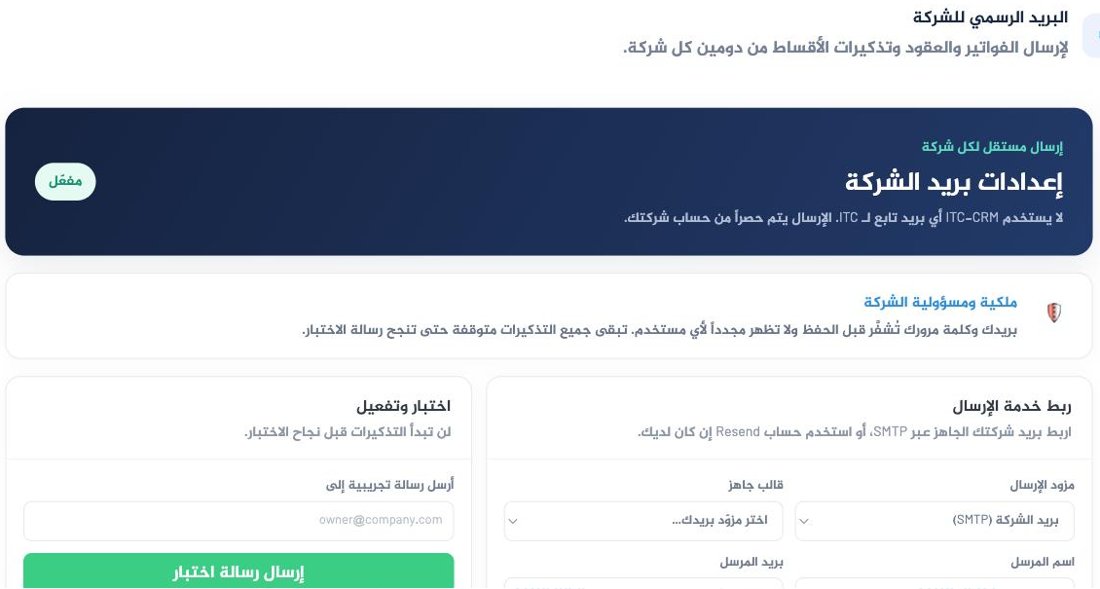
The platform sends invoices, contracts and instalment reminders from your company's own email, never from an address of ours. Your customer sees your name as the sender, and a reply comes back to you.
Why yours, not ours
If we sent under our name, half your customers' mail would land in spam and nobody could reply to you. And because the sending happens from your account, you own its credentials — which is why we ask for an address and a password, encrypt them before storing, and never show them again.
The platform sends nothing before that — no invoice, no reminder. This protects you from sending a hundred messages that all fail silently.
Route one — your company mail over SMTP
Best if you already have company mail (Google Workspace, Outlook, or your hosting provider).
- Under Sending provider choose Company mail (SMTP), then pick your provider from the ready-made templates so server and port fill in automatically.
- Fill in sender name and sender address — this is what your customer sees.
- Turn on two-step verification on your mail account.
- Create an app password and paste it into the password field.
- Set username to the same sender address in most cases.
It will not work with two-step verification, and more importantly it opens your whole mailbox rather than sending alone. An app password is a separate code you can revoke at any time without changing your real password.
Route two — Resend
Best if you send at volume or want a detailed delivery log.
- Create a Resend account in your company's name.
- Add your domain and verify the DNS records.
- Create an API key from the company account and paste it into the platform.
- Use an address on the verified domain — not a generic Gmail address.
The test message
Put your own address in Send a test message to and press Send test message. Open your mail: if it arrived, the setup is correct and reminders switch on immediately.
From then on, your company's mail log records every send: recipient, subject, result and time. That is your evidence when a customer says the invoice never arrived.
If it does not work
The test fails with an authentication error
Most likely you used the ordinary password instead of an app password, or the username differs from the sender address. Check both.
The test passes but mail lands in spam
Your domain lacks sending authentication (SPF and DKIM). That is configured at your domain provider, not in the platform, and it is the single most valuable thing you can do for your email.
I have no company email at all
Do not send from a personal Gmail under a company name — it lands in spam and reads as unserious. Buy your domain and an address on it first; it costs less than one lost invoice.